Everything up to now was built for one player: the person playtesting it, who knows where the secret walls are, plays with a controller and has seen every boss a dozen times. Sprint #2, the second overnight sprint, had a different brief: make Kindlefall ready for strangers. People who die on Floor I, who play on a keyboard with a layout we didn't plan for, who can't tell red from green, who sit far from a big screen. This post is what that took.
The Hearth: a reason to come back
Since the overnight sprint, souls have stayed with you between runs. The roadmap had promised a hub where "souls you banked buy permanent unlocks" because it "gives deaths meaning", and until Sprint #2 nothing permanent to spend them on existed. Now there is the Hearth.

It's in the spirit of Hades' Mirror of Night, and it's presided over by Mother Soot, the shopkeeper from every vault, whose lines react to your history: how many runs, how many deaths, whether Ser Cendric said goodbye, whether Vesper gave you her ember, whether a bloodstain is still waiting for you. "Back from the dark already? Bring Mother souls, dearie, and she'll make the next descent kinder."
Seven upgrades, in tiers that cost about 1.6 times more each time:
| Upgrade | What it does | Souls |
|---|---|---|
| Ember Heart | +10 / 20 / 30 max health | 90 / 145 / 230 |
| Deep Flask | One more flask (the Hollow, who has none, heals +1 more per soul instead) | 220 |
| The Hearth's Gift | Start each descent choosing one of two Common boons | 320 |
| Gambler's Bone | One reroll per run for shrine and vault cards | 130 |
| Kindled Shrine | Your first shrine rolls ranks as if you were on Floor III | 200 |
| Soul Keeper | Keep 25% / 40% of your souls when you fall | 120 / 190 |
| Old Customer | Mother Soot and Brann charge 15% / 30% less | 100 / 160 |
Everything maxed costs about 1,905 souls, roughly 12 to 20 runs at the soul income we halved after the first playtest. And there's a respec: press R (or Y) twice and every soul comes back. Mother keeps the soot.
Why no damage upgrades
The one rule the NPC team and the Balance team agreed on up front: no damage upgrades. Look at the list again: health, a flask, a reroll, a better first shrine, softer deaths, cheaper shopping. The Hearth makes a descent kinder, in Mother Soot's word, not stronger. Hitting harder stays the job of the boons you find in the run.
That rule mattered for a second reason. Sprint #2 also added a difficulty curve (difficulty.js) that watches how much power you're carrying, and the Hearth's health, flasks and rerolls are deliberately left out of that count, and the Gift boon is tagged so it can be subtracted. Otherwise buying an upgrade would quietly make the game harder to compensate. The Hearth also only applies to normal descents: Boss Rush, the Gauntlet and the Kindled One are score modes, and the code comment says why: "same footing for everyone".
Danger markings for colour-blind players
The game's colour language says red means danger. Every slam, every charge lane, every rune that's about to hurt you is painted red on the floor. For a player with red-green colour blindness, red on a warm brown dungeon floor is exactly the wrong choice.
So Settings has Danger markings: Red / Blue (colour-blind). With Blue on, every red-dominant ground telegraph (the decals and lanes) and every red wind-up flash on an enemy becomes a strong blue. Fire, gold, lava and the floors keep their colours; only the warnings change.
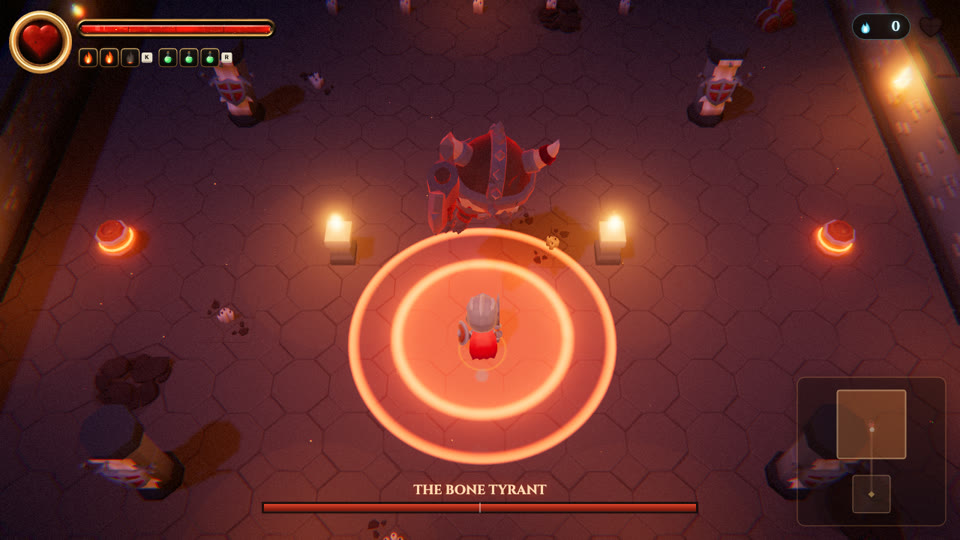 Danger markings: Red
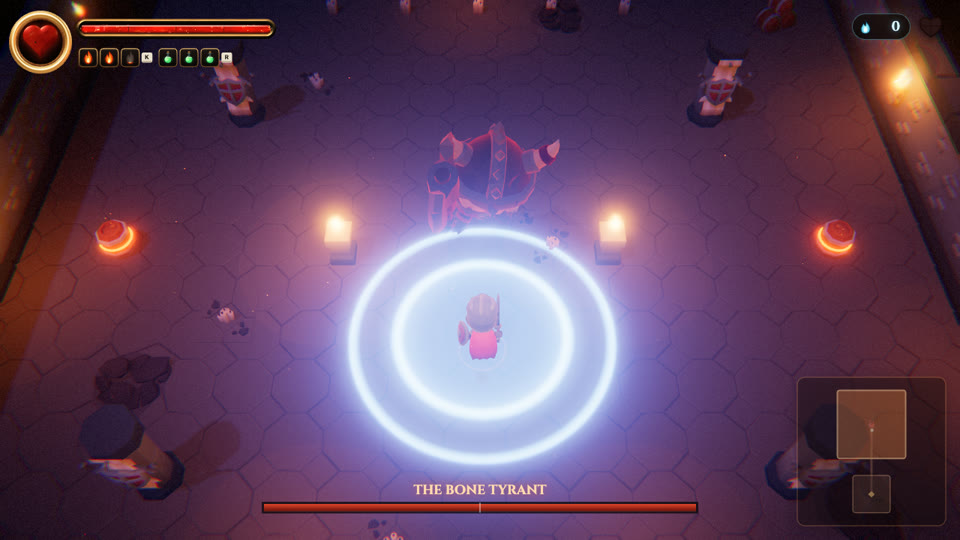 Danger markings: Blue
The same pass fixed telegraphs that broke the language for everyone. Floor VI's damaging telegraphs were pale blue-white; they're red now. A Floor III enemy's rooting circle was pale white-blue; it's violet like the rest of enemy magic. And the "glare" notes from the playtests became a Flashing setting (Full, Reduced, Minimal) that scales lights and hit flashes together.
Text size
Kindlefall's menus were sized for a laptop at arm's length. Settings now has Text and menu size: Small / Normal / Large, which scales the menus, overlays and the canvas HUD, capped so a tall menu never runs off a 720p window. The Bugs team checked Large at 1280×720 and 1920×1080 on the title, Settings, the Hearth, pause, Controls and boon cards: nothing off-screen.
 Normal
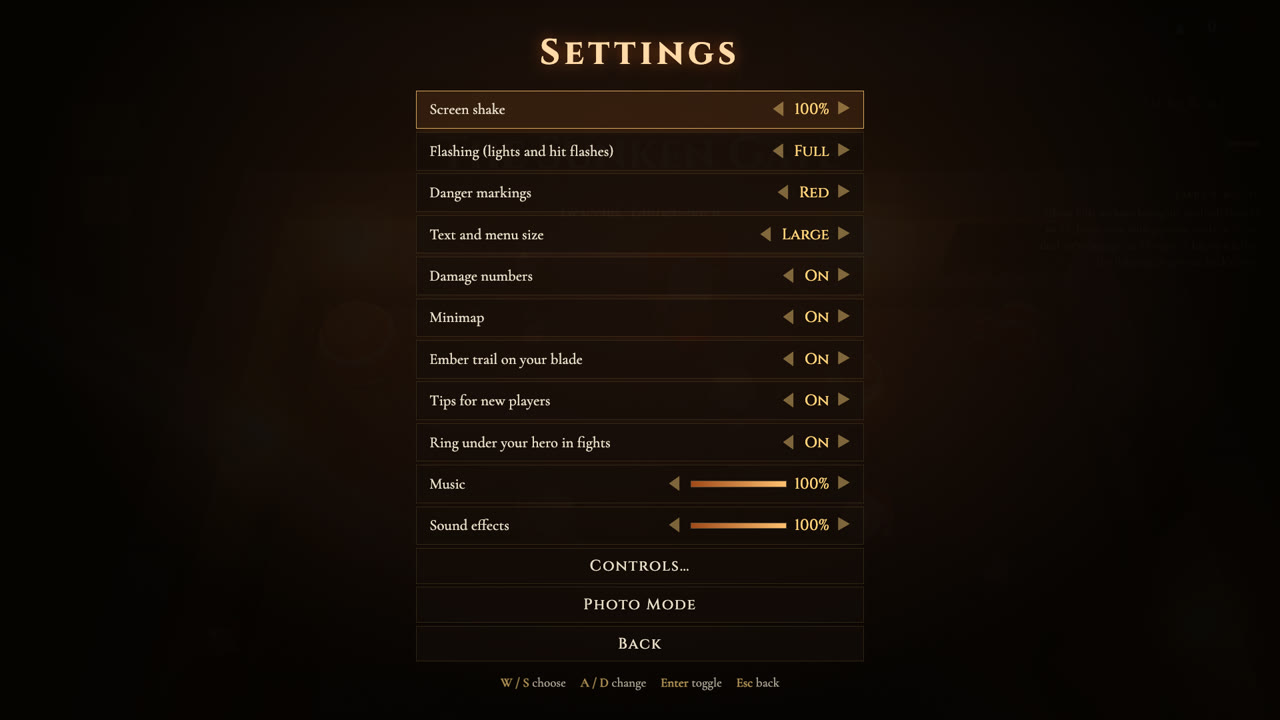 Large
LargeRebinding
Every key used to be hard-wired: J to attack, K for the spell, Space to dodge. Settings → Controls… now lets you rebind attack, dodge, spell, flask, the hero ability and Ash of War, on keyboard and controller separately. Press the action, press the key you want. If that key is already in use, the two swap. Movement, aiming and the menu keys are reserved, so you can't lock yourself out, and there's a Reset to defaults.
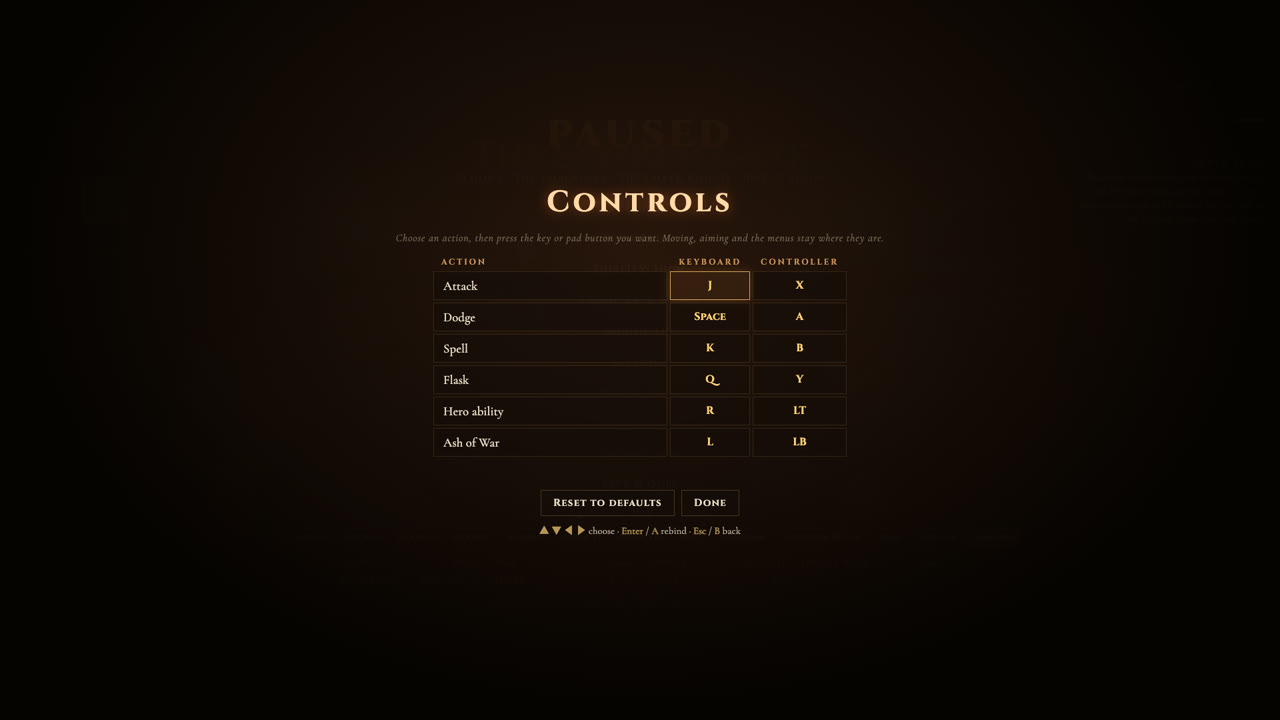
The detail that makes it feel finished is that everything else follows your binds: the button badges on the HUD, the controls list in the pause menu, the key caps in the new-player tips, the Ash of War prompt. The tests rebound attack to U and the spell to J and checked that the knight swings and casts on the new keys and the HUD badge changes with them. The final bug round still found two edge cases: binding a pad action to B closed the panel, because the press that set the bind was read again on the next frame as "back"; and the pause list showed the old keys until you paused again. Both fixed.
The leak hunt, in plain words
Strangers don't play one run. They play for an evening. So the Performance team ran a long-session health check: ten restarts, ten Save & Quit and Continue cycles, ten rounds of opening every overlay, four full descents and ten 30-second Gauntlet sessions, forcing a garbage collection before every measurement of textures, shader programs, memory, page elements and listeners. Anything that only goes up is a leak. They found four.
- Bone textures. Every animated character has a small texture on the graphics card holding its skeleton. Nothing ever freed it. Every enemy, every NPC, every hero swap left one behind; the warm-up alone left 27.
- Procedural monsters. The hand-built creatures (a Cinderling every time one spawned, the Forge Heart, the Mother of Tides, the Seraph's feathers) kept their geometry after they died.
- Orphaned enemies. When a fight was cleaned up, the code removed enemies from the same list it was walking through, so it skipped some. Summoned Cinderlings and Lampreys stayed in the scene forever: two per boss fight on Floors IV and V. The fix was one line.
- Photo Mode built a new colour-grade shader every time you opened it.
| Measured | Before | After |
|---|---|---|
| Graphics textures per restart | +1 every cycle (title: 59) | 0 (title: 32) |
| Geometry per full descent | +32 | +0 to 3 |
| Scene objects per descent | +36 bones every loop | flat |
| Shader programs per overlay open | +1 | 0 |
| Save & Quit / Continue | flat (memory +0.1 MB per cycle) | |
| Gauntlet, 300 seconds | flat | |
The same team looked at heat, because the development MacBook ran hot early on. The game holds its 60 fps cap in play, and menus run at 30. Paused screens now redraw the frozen world only every third frame, while still reading input every frame: the busy time per second while paused fell from 32 ms to 13, in Settings from 30 to 12, in the Codex from 22 to 8.
Earlier in the night, the Performance team also hunted hitches rather than leaks. On Apple Silicon a frame costs about 1.7 ms, so the game isn't slow; what you feel is the occasional long frame. They found five causes. The worst: on Floor VI, every crumbling tile rebuilt the navigation grid against every wall on the floor, a 20 to 30 ms frame per tile, mid-fight. Now it rebuilds only what's nearby, in under a millisecond, and building every floor's grid at load went from 1.4 seconds to about 70 ms. Load to title went from about 4 seconds to about 2. Boss fights now peak at 3 to 9 ms per frame, with no shader compiles mid-fight.
And the rest of "ready for strangers"
- Tips for new players that appear when they're relevant (one at a time, with gaps), remember what you've learned, and retire a tip you've seen in three runs without needing it.
- Gentler first floors: on Floor I a single blow from an ordinary enemy can't take more than 25% of your health (30% on Floor II). Bosses are untouched.
- Phones and tablets get an honest card: "Kindlefall is a desktop game: keyboard and mouse, or a controller", with a Try anyway button.
None of this is glamorous, and none of it shows up in a trailer. But it's the difference between a game that works for the person who made it and one you can hand to someone else.